
An Evernote collaboration detail that matters
February 9, 2026 | Issue 82 | Link to this issue | Subscribe
Hi Reader –
After 15+ years of using Evernote professionally, it's rare that I discover something new about how the app works.
But it happened last week.
And it's a collaboration detail that matters if you're sharing notebooks with anyone — whether that's a team member (like a VA), a client, or a family member.
How it works today is different from how it used to work back in the day. If you’re a long-time user, you may also need to update your understanding of this. And, for new users, this is a key detail to understand about a very useful feature.
Here’s what happened…
My Pinned Note Surprise
I'm currently training my new virtual assistant, Kim. She's an Evernote user, which makes collaboration simpler. We're sharing several notebooks so she can access the information she needs to support me.
I have a standard workflow: I pin key notes to the top of notebooks, so they're always visible and easy to find — process instructions, links to key notes and templates, and frequently accessed things.
But when Kim opened one of our shared notebooks, she could not see the two notes I had pinned to the top.
Wait, what?
I was genuinely surprised because I assumed pinned notes were a shared feature (as they were in the past). So, if I share a notebook with someone and pin notes inside it, I expect the other person to see those same notes pinned at the top.
Turns out, it no longer works this way.
At one point, the option to pin notes went away. But when Bending Spoons reintroduced this feature in v10 in June 2024, it worked similarly, though not exactly the same.
Pinned Notes Are Local to Your Account
Here's what I learned: Pinned notes are now a local feature.
When you pin a note to a notebook, that pin only exists in your account. It's your personal organization preference.
If you share that notebook with someone else, they don't see your pins. They can create their own pins in the shared notebook, but they have to do it manually.
There's no way to control this in preferences. There's no setting to make your pins visible to collaborators. That's just how the feature works.
This means if I'm pinning notes expecting Kim to see them at the top of the notebook, I'm using the wrong strategy. She has to go in and pin them herself — and she'd have to know which ones I want her to prioritize.
Not ideal for collaboration.

In this shared notebook, everyone sees the same set of notes, but each user only sees the pins they've pinned in their own account.
A Better Collaborative Solution: Spaces
When you share a Space (not just a notebook), there’s a different pinning option.
If I create a new Space, move relevant notebooks into it, and share the Space with Kim, I can pin notes to the top of the Space. She'll see exactly what I pin.
This is better for collaboration because I can highlight the most important information and know she's seeing the same thing I'm seeing.
The trade-off? I'm not a huge fan of creating single-notebook Spaces. It feels excessive. A Space for one notebook seems like overkill.
But if I need Kim to always have quick access to specific pinned notes, I have to share the Space. There's no other way to make that work.
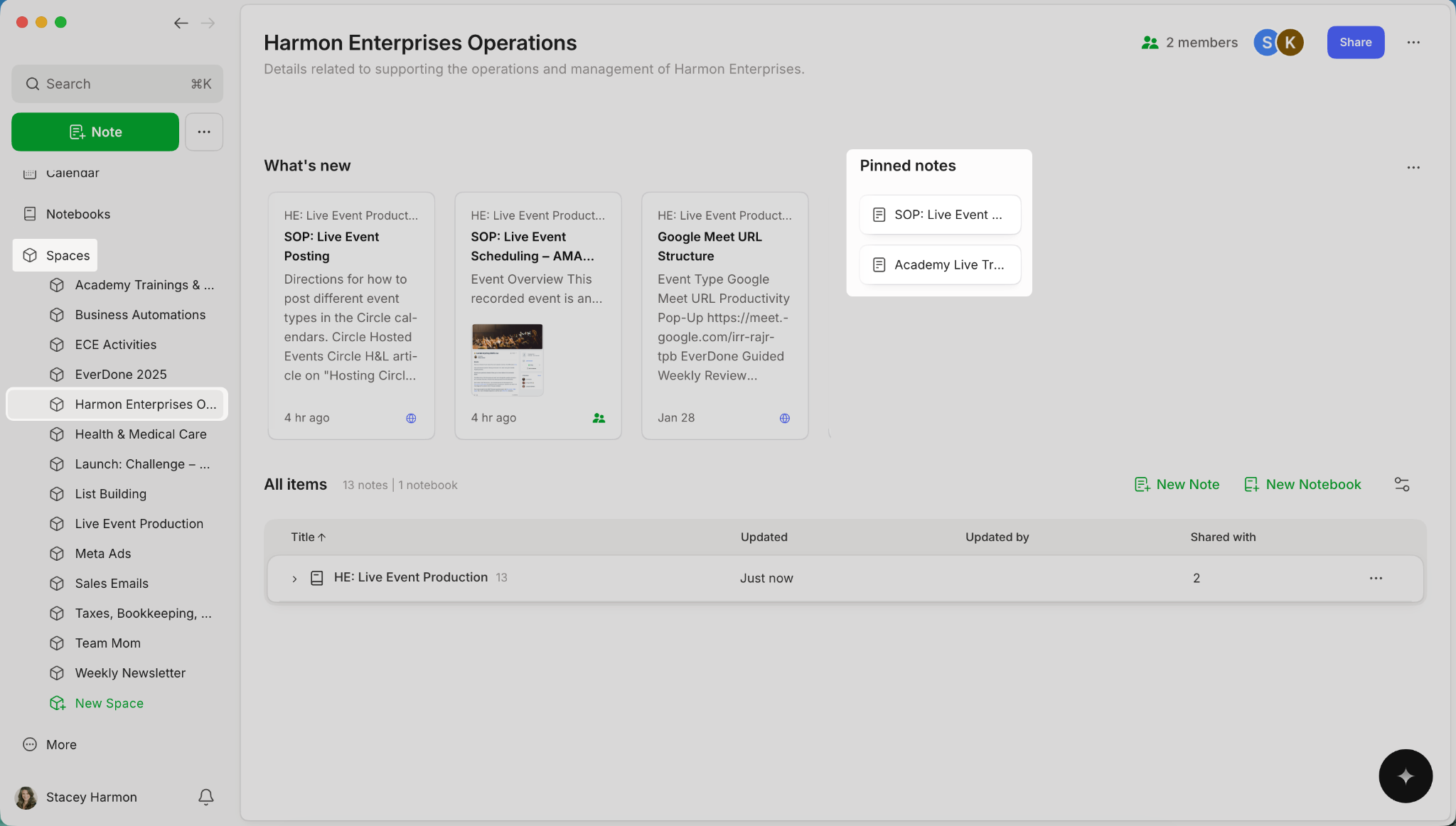
All members of the Space see the same pinned notes.
There's No Right or Wrong Here
This is one of those Evernote details where there's no universal "best practice."
It depends on your use case.
If you're working solo or you don't care whether collaborators see your pinned notes, sharing notebooks is perfectly fine.
If you're managing a team and need everyone to see the same prioritized information at the top of a notebook, use Spaces.
The key is understanding how the tools work so you can match them to your outcome.
I've been using Evernote professionally for years, and I didn't recognize this nuance until I ran into it firsthand. Now that I fully understand how the features work, I can make better decisions about how to structure shared content for my team.
It's a small detail, but it impacts how effectively you can collaborate inside Evernote.
And it reminds me that even after 15 years, Evernote can still surprise me.
Cheers to your productivity —
Stacey

Subscribe to auto-receive my next tip!
No fluff. Just practical, immediately actionable advice from someone who's been teaching Evernote mastery for over a decade. Sent every Monday, for free.